Biomechanical Performance Engine

Stop "Typing."
Start Factorizing Speed.

The first professional desktop engine that treats typing as a high-fidelity motor memory problem. Move beyond simple accuracy tests into deep spectral analysis and neuro-modal training.

Traditional Tutors vs. TYPE

Most software treats typing as a series of letters. We treat it as a series of Biomechanical Transitions.

The Traditional Way

  • ✕ Binary feedback (Right or Wrong).
  • ✕ Focuses on surface Speed (WPM).
  • ✕ Randomized practice material.
  • ✕ Ignores the physics of the hand.

"I typed 80 WPM but I keep tripping over the same three words."

The TYPE Methodology

  • ✓ Nanosecond-accurate latency tracking.
  • ✓ Focuses on Transition Cost.
  • ✓ Adaptive "Spectral Injection" drills.
  • ✓ Models neurological "hesitation."

"I isolated the 14ms latency between R and T and eliminated it."

Core Algorithm

The Spectral Matrix.
Total Visibility.

Your speed is limited by your weakest link. Our engine builds a persistent, mathematical map of every single key transition your hands perform.

Latency Factorization

We don't just count errors. We measure the Inter-Key Latency (IKL). A key typed correctly but slowly is an un-optimized motor path.

Instability Detection

Using FlowMath, we analyze the variance of your rhythm. High variance indicates cognitive load; low variance indicates a mastered "Flow State."

Deterministic Adaptation

The app identifies your six weakest transitions and seamlessly injects them into your next lesson until the latency is factorized out.

// Spectral Cost Calculation
double cost = (errorRate * 1000.0);
cost += avgLatencyMs;
cost += latencyStdDevMs;

// Identify bottlenecks
auto weakest = query.topByCost(6);
for (auto& pair : weakest) {
  lesson.inject(pair.keyFrom, pair.keyTo);
}
Precision: 0.001ms
Neuro-Feedback Layer

SENSE™: Anticipatory Reflexes

Typing is usually a "reactive" process. SENSE™ turns it into an "anticipatory" one by building secondary neurological pathways through color and sound.

// VISUAL ANCHORS

Anticipatory Window

Instead of coloring the whole screen, TYPE tints only the next 1-2 glyphs. The color is derived from motor space (key position), not letter identity. Your brain learns to "see" where the key is before you think of the letter.

// SONIC FEEDBACK

Luminance-to-Pitch

A subtle, non-intrusive audio tone correlates to the visual brightness of the key. This monotonic mapping provides a sonic biomechanical map that triggers during hesitation, guiding your fingers via auditory cues.

// NEURO-SYNC

Personalized Map

Neuroscience is individual. Using the Theming Pipette, you can override any procedural color. If your brain perceives 'E' as Green, you deposit Green on 'E'. SENSE™ becomes a mirror of your own unique neurological associations.

The Stroop Audit

How deep is your motor memory? Our built-in Stroop Stress Test presents keys in conflicting colors to measure your cognitive interference. If you can type through the noise, your motor reflexes are truly autonomous.

A
A
(Conflict Detection Active)

[Status] Calibration Complete
[Result] 140ms Gain in "Shift+Key" associations.
[Note] Visual intensity adapted to user sensitivity.

Professional Environment

The Professional Cockpit

TYPE provides a high-density diagnostic HUD (Heads-Up Display) designed to give you total visibility into your hand biomechanics in real-time.
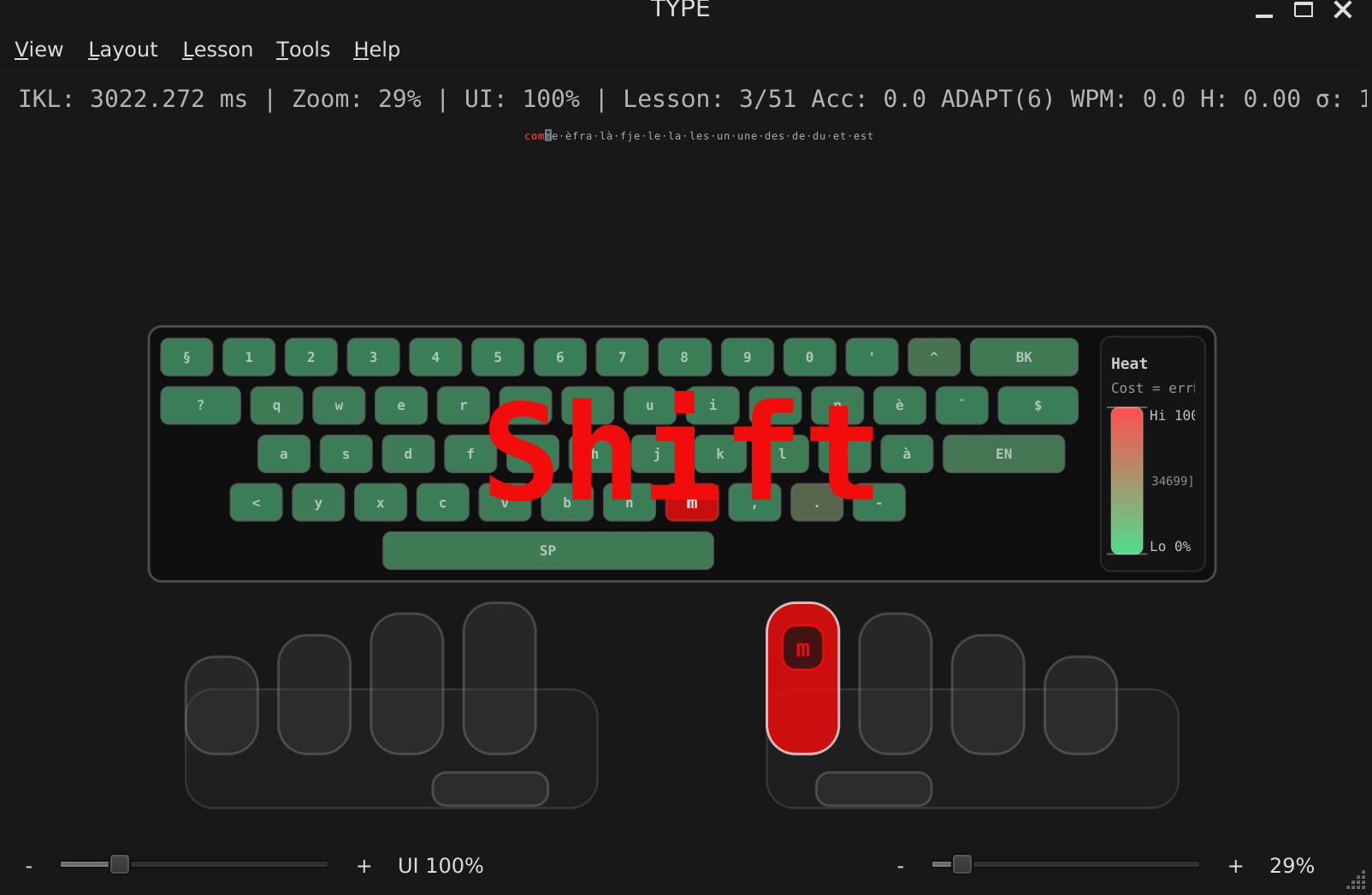
TYPE Interface
[ USER INTERFACE SCREENSHOT ]
(Insert HUD, Keyboard Heatmap, and Ghost Hands image here)

01 Polyglot Profiles

The competition assumes you only type one way. TYPE knows that Coding requires different biomechanics than Creative Writing. Create specific profiles for different languages (English, French, German, Italian) or usage contexts. Each profile maintains its own unique Spectral Matrix.

02 Spatial Mirroring

Our Keyboard Heatmap doesn't just show "frequent" keys. It visualizes Biomechanical Difficulty. By aggregating latency and error data, the Spatial Mirror reveals which physical areas of your keyboard are causing "Flow Collapse."

03 Ghost Hand Guidance

Stop looking down. The Ghost Hands Overlay provides transparent, peripheral finger-positioning cues. If you hesitate, the software dynamically highlights the correct finger and key, using the Hesitation Model to ramp up visibility only when your brain needs the hint.

Global Layout
Expansion.

Native desktop performance means zero-latency support for complex layouts. Unlike web-based tools, TYPE handles ISO102, Dead Keys, and AltGr layers natively.

QWERTY US/UK AZERTY FR/BE QWERTZ DE/CH DVORAK Nordic SE/NO/DK/FI
// ANALYTICS_ENGINE: RETENTION_SMOOTHING
WEEK_01 WEEK_02 WEEK_03 WEEK_04
Transparency & Analytics

Science You Can See.
Data You Own.

We don't believe in "black box" progress. Your motor memory data is stored in a local SQLite database on your machine. You own the laboratory.

  • Progress Smoothing: Use Moving Average (MA) filters to strip away the "noise" of bad days and see the true mathematical trend of your evolution.
  • Retention Metrics: Analyze your Forgetting Curve. TYPE tracks which key combinations degrade over time when not practiced.
  • Full Portability: Export your entire biomechanical history to JSON, CSV, or high-fidelity PNG for external analysis or professional reporting.

Ready to Factorize Your Speed?

Choose your level of access to the TYPE Laboratory.

Lab Access

$0

Complete biomechanical engine with basic diagnostic tools.


  • ✓ Spectral Transition Tracking
  • ✓ Ghost Hand Guidance
  • ✓ standard Layout Packs
  • ✕ SENSE™ Neuro-Feedback
  • ✕ Retention Dashboards
Download Lab
PROFESSIONAL CHOICE

Pro Neuro Suite

$39.99/lifetime

The full multi-modal neuro-feedback laboratory.


  • Everything in Lab Access
  • SENSE™ Visual & Audio
  • Stroop Audit Capability
  • Theming Pipette Tool
  • Multi-Context Profiles
Get Full Access

Contributor

$99

Directly fund future biomechanical research.


  • Everything in Pro
  • ✓ Priority Feature Access
  • ✓ Alpha/Beta Build Testing
  • ✓ Founding Credit in Menu
Support Development